
The modern IT landscape is complex, hybrid, multi-cloud, and continuously evolving. Organisations must model thousands of artefacts across services, applications, platforms, infrastructure, cloud workloads, and end-user environments. Without a unified classification standard, this complexity results in inconsistent modelling, unclear ownership, unreliable CMDBs, audit gaps, duplicated data, unmanaged technology risk, and difficulties in meeting regulatory expectations, such as DORA and SOC2.
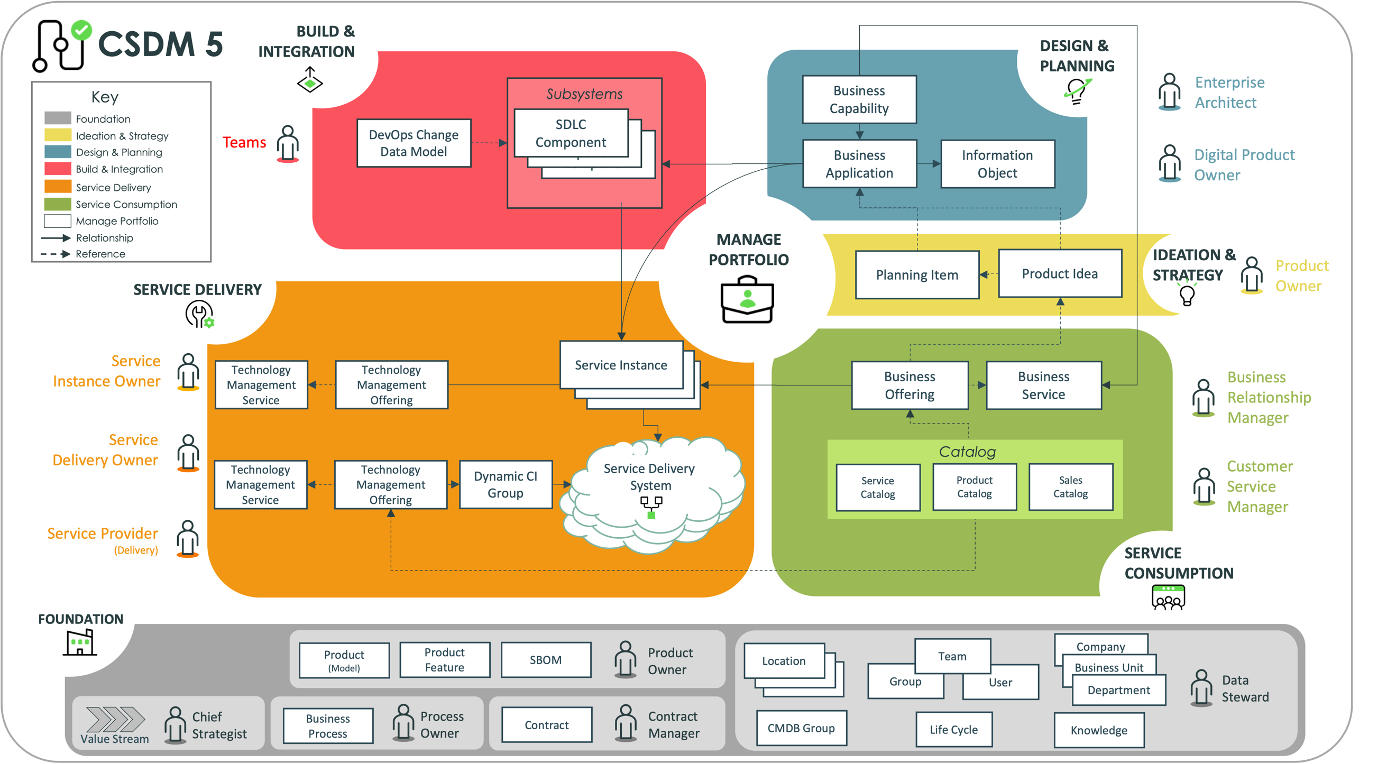
The IT Artefact Classification Standard provides a complete and consistent taxonomy for structuring all IT artefacts across four layers:
- Portfolio Layer
- Design Layer
- Configuration Management Layer
- Foundation Layer
The model integrates:
- Business and Technical Services
- Business and Technical Applications
- Application Components
- End-User Software Baselines (packages)
- SaaS Baselines (suites)
- Installed End-User Software
- Workplace Services
- Cloud, Workplace, Platform, and Infrastructure CIs
- Technology Standards
- Product Models
- Master/Reference Data
This standard ensures clarity, improves accountability, enables service mapping, supports technology lifecycle risk management, strengthens compliance alignment, and provides a stable foundation for automation, discovery, CMDB integrity, and architectural decision making.
1. Introduction
Today’s IT environments comprise thousands of discrete artefacts, including:
- Services and service offerings
- Business and technical applications
- SaaS suites and tenants
- Application components and deployable units
- Infrastructure, cloud, and platform resources
- Application workloads and platform workloads
- End-user devices and software packages
- EUC configuration baselines and device policies
- Technology standards, lifecycles, and product models
When each domain models these artefacts independently, classifications diverge. The resulting fragmentation leads to duplicate data, incorrect CMDB entries, unclear application ownership, inconsistent service maps, security blind spots, technology risk accumulation, and architectural misalignment.
This standard defines a unified, enterprise-wide classification model:
- What artefact types exist
- Which layer do they belong to
- What are the boundaries between layers
- Which artefacts become CIs and which remain reference definitions
- Which artefacts represent business value, and which are technical constructs
- How to model EUC software and Workplace Services consistently
- How service and application portfolios relate to deployed CIs
- How technology standards and lifecycle policies are represented
The primary objective is structural clarity, not procedural instruction.
2. Drivers and Principles
2.1 Drivers
- Integrate Services, Applications, Platforms, Cloud, Infrastructure, and End-User Computing into a single modelling approach.
- Provide a foundation for Service Portfolio and Application Portfolio Management.
- Ensure CMDB accuracy by separating design artefacts from deployed CIs.
- Meet audit expectations related to drift, technology standards, and lifecycle.
- Enable discoverability for Workload, EUC, Cloud, and Platform.
- Support rational architecture and lifecycle governance.
2.2 Principles
- Each artefact belongs to exactly one layer.
- Portfolio artefacts represent stable logical constructs, not deployments.
- Design artefacts define what can be deployed, not what is running.
- Configuration Items represent all real deployed artefacts.
- Foundation artefacts provide standards, normalisation, and lifecycle metadata.
3. Overview of the Four-Layer Model
The IT Artefact Classification Standard defines a layered architecture comprising:
- Digital Portfolio Layer
- Design & Build Layer
- Configuration Management Layer
- Foundation Layer
Each layer contains distinct artefact types with clear modelling boundaries.
Digital Portfolio Layer
The Portfolio Layer contains stable, governed artefacts independent of runtime execution. Portfolio artefacts do not appear as CIs and do not depend on specific environments.
Included artefacts:
- Business Capabilities
- Business Services
- Technical Services
- Workplace Services
- Business Applications
- Technical Applications
- SaaS Suite Baselines
3.1 Business Capabilities
Business Capabilities are functional abilities that the organisation must perform (for example, Customer Onboarding, Loan Origination, Regulatory Reporting). They are technology-agnostic, stable over time, and independent of specific applications or services.
3.2 Business Services
Business Services deliver business value to internal or external customers, such as a Mortgage Origination Service or a Digital Workplace Service. They represent functional
outcomes and commitments, not implementation details.
3.3 Technical Services
Technical Services provide reusable technical capabilities that support applications and business services. Examples include Compute Service, Database Hosting Service, Messaging Service, and Identity Service.
3.4 Workplace Services
Workplace Services provide end-user productivity capabilities, such as Digital Workplace, Collaboration Service, Device Provisioning, VDI, and Mobile Device Services. They are
portfolio artefacts and do not depend on the number of devices or installations. Workplace Services are a type of Business Services.
3.5 Business Applications
Business Applications are logical applications that support business processes (for example, a Mortgage Engine or HR Application). They are independent of environment, deployment or technology version.
3.6 Technical Applications
Technical Applications are platforms or tooling systems such as integration platforms, monitoring platforms, CI/CD tools, and identity platforms. They support other applications
and services.
3.7 SaaS Suite Baselines
A SaaS Suite Baseline is the logical definition of a SaaS product used by the enterprise (e.g., Microsoft 365, Salesforce, ServiceNow Platform, Adobe Cloud).
These are portfolio-level applications, not CIs. Tenants and environments are modelled as CIs in the Configuration Layer.
3.8 Interactions Within the Portfolio Layer
Applications support Services; Services deliver Capabilities. Workplace Services provides a governed wrapper around end-user computing capabilities. SaaS Suites provide capabilities to Workplace Services and Applications. These relationships are functional and not infrastructure-dependent.
Design & Build Layer
The Design Layer contains artefacts that define what can be deployed. These artefacts are environment-independent and are not CIs unless instantiated.
Included artefacts:
- Application Components
- EUC Software Baselines
- SaaS Baseline Definitions
- Workplace Configuration Baselines
- Integration Specifications
- Deployment Templates (IaC, CI/CD manifests)
- API Schemas
4.1 Application Components
Application Components are deployable building blocks such as binaries, container images, modules, functions, scripts, or schema definitions. They define the composition of an
application, but do not represent runtime instances.
4.2 EUC Software Baselines
EUC Software Baselines represent installable packages managed via Intune, SCCM, Entra, Company Portal, or equivalent tools. They describe the software, its version, and deployment configuration, not the installations themselves.
4.3 SaaS Baseline Definitions
A SaaS Baseline Definition describes the intended configuration of a SaaS platform: modules, roles, security policies, integration patterns and configuration templates. It is
not a tenant and does not represent a CI.
4.4 Workplace Configuration Baselines
Workplace Configuration Baselines include:
- Intune device configuration profiles
- Conditional access policies
- Compliance policies
- VDI golden images
- VPN and Wi-Fi configuration templates
These artefacts define expected device and session behaviour but are not themselves CIs.
4.5 Integration Specifications
Integration Specifications are design artefacts such as API contracts, mapping specifications, interface descriptions, and integration patterns. They define the structure and semantics of integration flows.
4.6 Deployment Templates
Deployment Templates include Terraform modules, ARM/Bicep templates, CloudFormation stacks, Kubernetes manifests, and CI/CD packaging descriptors. They express how infrastructure and workloads are provisioned.
4.7 API Schemas
API Schemas or interface definitions formally describe APIs and interfaces independent of their deployment state. They are used by integration and development teams.
4.8 Rules for the Design Layer
- Design artefacts define what can be deployed, not what is running.
- Design artefacts do not contain environment-specific attributes.
- Design artefacts do not appear in the CMDB unless instantiated.
- Design artefacts support Applications and Services at design time.
Configuration Management (CMDB) Layer
The Configuration Management Layer contains all artefacts that exist in reality: deployed, provisioned, installed, instantiated, or running. Every artefact in this layer is represented as a Configuration Item (CI).
5. Configuration Items (CIs)
A CI is any artefact that exists physically or virtually in an environment and is deployed, installed, provisioned, instantiated, or running. Examples include:
- Virtual machines and physical servers
- Cloud resources (compute, network, storage, PaaS services)
- Platform runtimes (Kubernetes clusters, integration engines)
- Application workloads (containers, functions, application service instances)
- Workplace devices (laptops, desktops, mobile devices, VDI sessions)
- Installed software on devices and servers
- SaaS tenants
- Network and security artefacts
- Storage objects and volumes
- Integration runtimes and data pipelines
5.1 CI Categories
5.1.1 Cloud Infrastructure CIs
Cloud Infrastructure CIs include compute, network, storage, and security artefacts provisioned in cloud platforms such as Azure, AWS, or GCP:
- VM instances
- Virtual networks, VPCs, and subnets
- Load balancers and gateways
- Managed disks and cloud storage buckets
- Cloud databases and managed database services
5.1.2 Platform Runtime CIs
Platform Runtime CIs represent execution and control-plane components that host workloads:
- Kubernetes clusters and nodes
- Integration runtimes
- API gateway runtimes
- Messaging brokers
- ETL and data pipeline runtimes
5.1.3 Application Workload CIs
Application Workload CIs are instances of deployed components actually running in environments:
- Running containers and microservices
- Serverless functions
- Application service instances
- Integration flows in execution
- Scheduled jobs and data pipeline runs
5.1.4 Workplace Device CIs
Workplace Device CIs represent physical and virtual endpoints:
- Laptops and desktops
- Thin clients and VDI sessions
- Mobile devices and tablets
5.1.5 Installed Software CIs
Installed Software CIs represent software installed on devices or servers:
- Office applications such as Word or Excel
- Collaboration tools such as Teams
- PDF readers and productivity tools
- Security agents and endpoint protection
- Developer tools and runtimes
Each installation is a CI and should be linked to a Product Model and Technology Standard.
5.1.6 SaaS Tenant CIs
SaaS Tenant CIs represent actual SaaS environments:
- Microsoft 365 production tenant
- Salesforce orgs
- ServiceNow instances
- Workday tenants
- Atlassian Cloud organisations
5.1.7 Network and Security CIs
Network and Security CIs include:
- Firewalls and firewall policies
- Network security groups and routing policies
- VPN gateways and proxies
- DNS zones and records
- Certificates (if in scope)
5.1.8 Storage CIs
Storage CIs include:
- File shares
- Storage pools and volumes
- Cloud storage buckets
- Database storage allocations
5.1.9 Integration Runtime CIs
Integration Runtime CIs include:
- Data integration pipelines
- Event stream processors
- Message queues and topics
- File transfer runtimes
5.1.10 VDI and Endpoint Platform CIs
These CIs support virtual desktop and endpoint platforms:
- VDI brokers and controllers
- Host pools and session hosts
5.2 Relation of CIs to Digital Product Models
Each CI should reference a Digital Product Model in the Foundation Layer for consistent naming, vendor metadata, version, and lifecycle information.
5.3 Relation of CIs to Technology Standards
Technology Standards define which versions are allowed, deprecated, or forbidden. CIs inherit lifecycle status by mapping their Product Models to Technology Standards. This enables automated detection of obsolete or non-compliant technology.
5.4 Relation of CIs to Digital Portfolio Artefacts
CIs support Applications and Services without becoming them:
- Workload CIs support Business and Technical Applications.
- Infrastructure CIs support Technical Services.
- Workplace Device and Installed Software CIs support Workplace Services.
- SaaS Tenant CIs support SaaS Applications.
5.5 Rules for the Configuration Layer
- Any deployed or installed artefact in scope must be a CI.
- A CI represents absolute configuration and potential drift.
- CI classes must be consistent and normalised.
- CIs must reference Product Models where applicable.
- Technology Standards and lifecycle rules apply to CIs.
- Design artefacts appear here only when instantiated.
Foundation Layer
The Foundation Layer contains reference data and governance artefacts that do not represent deployments or runtime execution. It provides the standards, models, and structures used to normalise and govern all other layers.
Included artefacts:
- Product Models
- Technology Standards and Lifecycle Definitions
- Vendors, Companies, and Suppliers
- Users, Groups, Roles, and Departments
- Locations
- Reference Processes
- Regulatory and Classification Metadata
6.1 Product Models
Product Models describe the canonical definition of hardware, software, and cloud products, including vendor, version, lifecycle, and classification. CIs reference Product Models.
6.2 Technology Standards and Lifecycle Definitions
Technology Standards specify which technologies and versions are strategic, approved, tolerated, restricted, deprecated, or forbidden, along with vendor end-of-support dates and internal retirement plans.
6.3 Vendors, Companies, and Suppliers
These are reference definitions of suppliers, manufacturers, partners, and internal companies used for procurement, contracts, and accountability.
6.4 Organisational Structure
Users, groups, roles, and departments provide identity and responsibility anchors for applications, services, and CIs. They are not CIs themselves.
6.5 Locations
Locations describe offices, data centres, and logical cloud regions. They normalise location metadata across CIs and services.
6.6 Reference Processes and Regulatory Metadata
Reference processes (such as change management) and regulatory metadata (risk categories, compliance frameworks, controls) provide governance context for all layers.
6.7 How the Foundation Layer Supports All Other Layers
- Supports Portfolio artefacts with technology and vendor metadata.
- Supports Design artefacts with approved product families and standards.
- Supports Configuration artefacts with normalisation and lifecycle status.
- Supports governance, risk management, and compliance across the enterprise.
Cross-Layer Relationships and Governance Rules
7. Cross-Layer Relationships
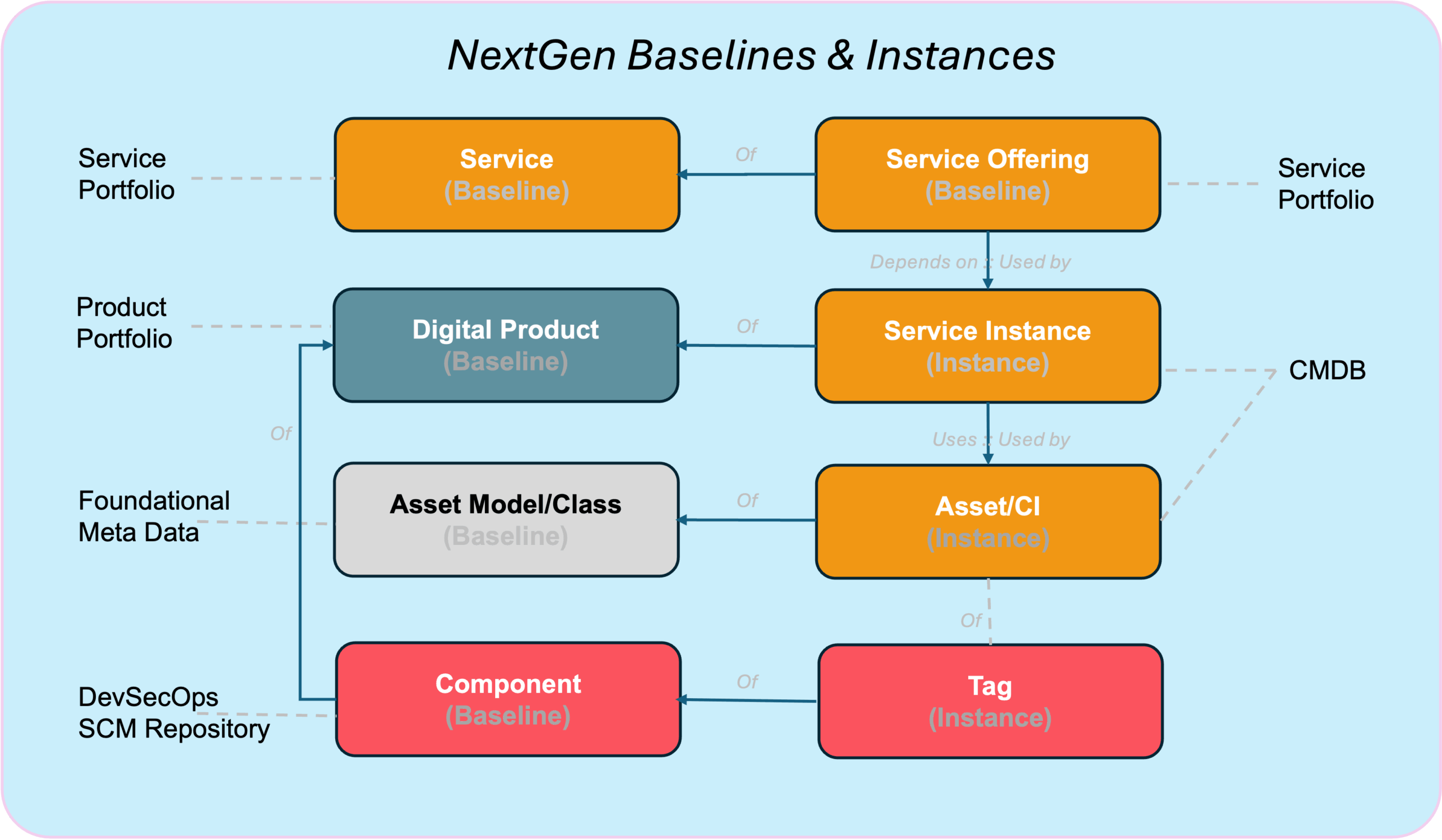
- Digital Portfolio → Design: Portfolio artefacts rely on Design artefacts for implementation blueprints.
- Design → Configuration: Design artefacts become CIs when instantiated or deployed.
- Configuration → Digital Portfolio: CIs support and implement Services and Applications.
- Foundation → All Layers: Foundation artefacts normalise, constrain, and govern all other layers.
8. Full Artefact Classification Summary
8.1 Portfolio Layer
- Business Capabilities
- Business Services
- Technical Services
- Workplace Services
- Business Applications
- Technical Applications
- SaaS Suite Baselines
8.2 Design Layer
- Application Components
- EUC Software Baselines
- SaaS Baseline Definitions
- Workplace Configuration Baselines
- Integration Specifications
- Deployment Templates
- API Schemas
8.3 Configuration Management Layer
- Cloud Infrastructure CIs
- Platform Runtime CIs
- Application Workload CIs
- Workplace Device CIs
- Installed Software CIs
- Network and Security CIs
- Storage CIs
- SaaS Tenant CIs
- Integration Runtime CIs
- VDI and Endpoint Platform CIs
8.4 Foundation Layer
- Product Models
- Technology Standards
- Vendors
- Users, Groups, Roles
- Locations
- Reference Processes
- Classification Schemes
- Regulatory Metadata
9. Governance Rules
- Portfolio artefacts never appear as CIs and must not contain environment attributes.
- Design artefacts represent definitions and become CIs only when instantiated.
- Configuration Items represent all deployed, installed, or running artefacts in scope.
- Foundation artefacts provide standards, product definitions, and reference structures.
- Every artefact must have clear ownership and accountability.
10. Structural Diagram (Text Representation)
- Portfolio Layer: Capabilities, Services, Applications, SaaS Suites.
- Design Layer: Components, Baselines, Templates, Policies, Schemas.
- Configuration Layer: Devices, Software Installations, Cloud Infra, Workloads, SaaS Tenants, Network/Security, Storage.
- Foundation Layer: Product Models, Technology Standards, Vendors, Users/Groups, Locations, Reference Data.

Leave A Comment