ServiceNow’s Common Service Data Model is currently a hot topic in the world of IT Management. I know a few people who have actually tried to read the CSDM whitepaper; there is even a CSDM training/certification available. The broad, high-level, one-size-fits-all CSDM5 offers a data model that can coexist with the many Frameworks that you may use within your company.
Much like IT4IT 3.0, the CSDM distinguishes “Ideation & Strategy”, “Design & Planning”, “Build and Integration”, “Service Delivery”, “Service Consumption”, and “Manage Portfolio” domains. Each object in the Data Model belongs to a single domain. Currently, only a few companies use one platform to manage all domains. Usually, “Build and Integration” is done using multiple technology-specific tools. Observability, Continuous Integration, Continuous Delivery, and Container Orchestration increasingly are treated as separate DevOps domains. Security Response also increasingly becomes a separate domain.
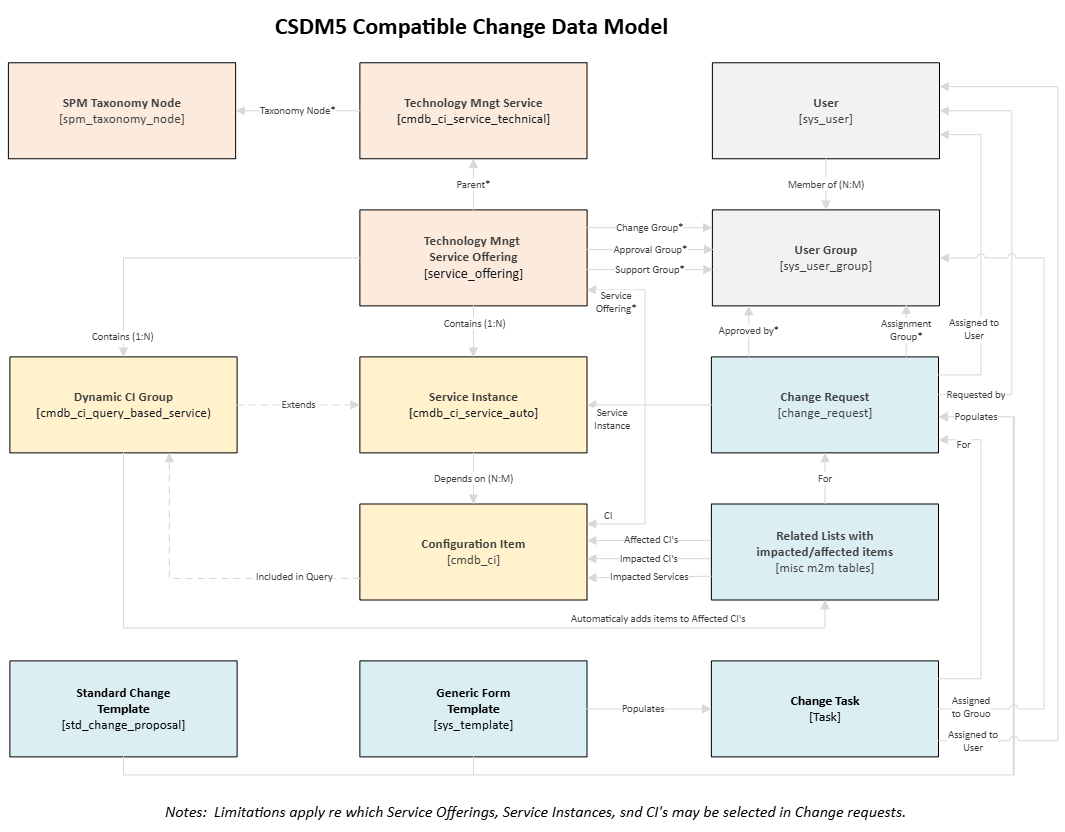
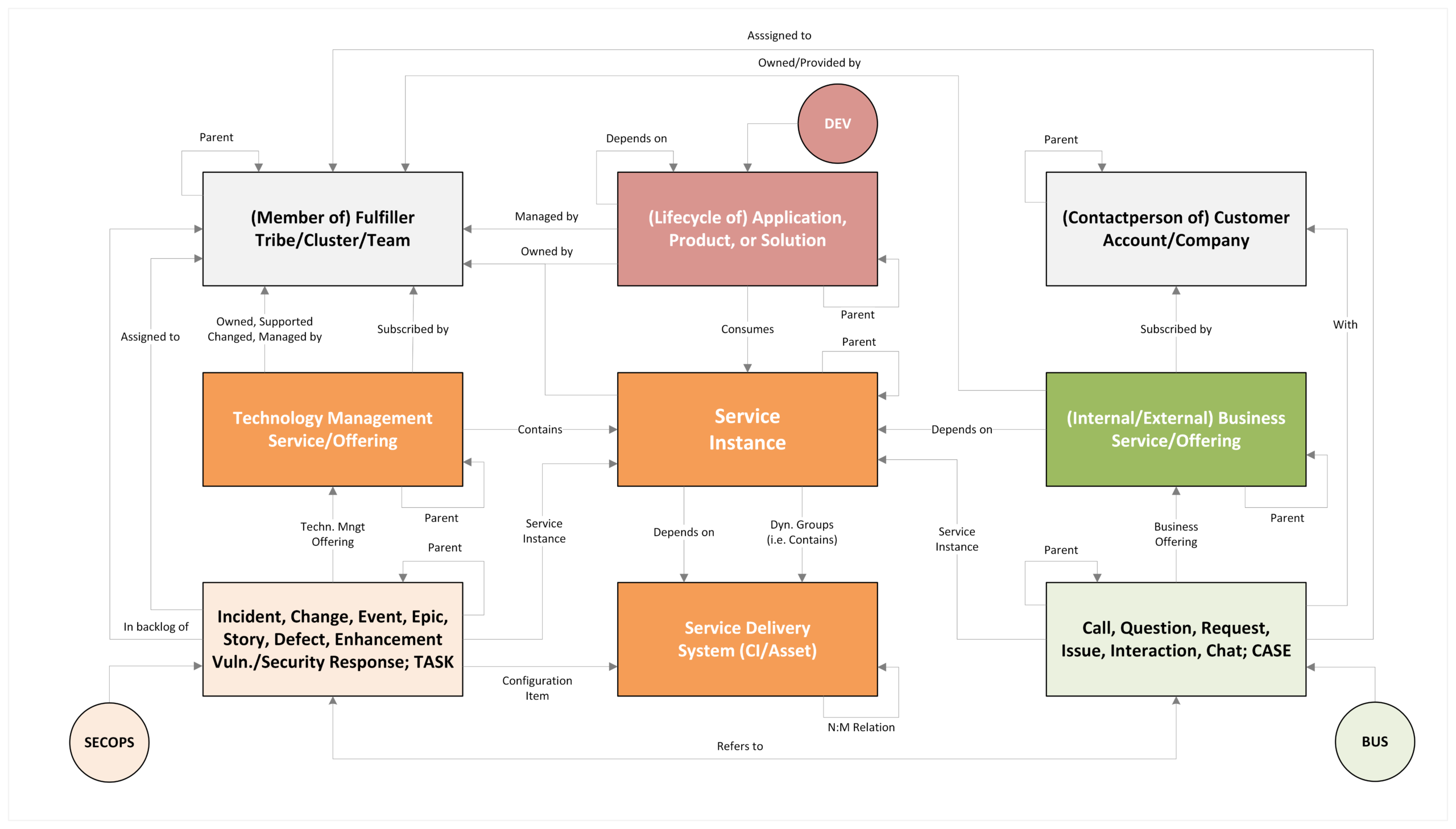
In the picture above, the most important objects of the Common Service Data Model (CSDM) are listed, regardless of the domain in which they are used/managed according to ServiceNow. This makes this picture more universable usable, irrespective of the use of (variants of) DevOps, Dev & Ops, DevSecOps, BusDev, or BusDevOps.
CSDM OBJECTS
CSDM defines the Business Application object, which could be a (logical or physical) product or a service, that enables zero or more Business Capabilities/Functionalities. An application may be deployed zero or more times. An application may contain components that can be deployed independently or as part of the application. Each Business Application has a life-cycle that must be managed by an Agile Team. Other frameworks use the word “Solution” for Business Applications, but mean exactly the same thing. In CSDM, Application Software provided as a Service (SaaS) is also considered a Business Application.
Middleware, Cloud, and IaC are not considered business applications but are technology management service offerings. The deployed technical items are deployed as part of an Infra stack/template,
Application Stacks of/for Business Applications and/or Technology Management Services may be instantiated multiple times. Each deployed stack is called a Service Instance. Typically, stacks are environment-, technology-, or location-specific, or a mixture thereof. E.g., a company may have three country-specific O365 Production Tenants, and one generic O365 Test Tenant. In total, the company has four service instances of the same “AD Application”. Some Service Instances are no stacks but logical groupings of similar items (e.g., “Windows Servers in NL” and/or “Windows Production Servers”.
A stack typically is a collection of related items. E.g., a Java Application Resource that is hosted on a Java App Server, that is running on a Windows Server, etc. Each item is registered separately as a Configuration Item (CI). The collection of CIs is called the Service Delivery System (formerly known as CMDB). The items are interlinked via CI-Relations. Nowadays, manual registration is a thing of the past; the items and their relations are automatically discovered or federated from a trusted data source. The Service Instances are related (manually or automatically) to the top-level CIs they depend on.
The Configuration Items in CMDB are stored in class-specific tables. ServiceNow holds 800+ hierarchical CMDB tables (e.g., the Windows Server table extends the Server table, which extends the Computer table, which extends the Hardware table, which extends the Configuration item table). The (grand)parent tables include the records of its (grand)child tables. The child table inherits the attribute definitions from its (grand)parent table. That said, each CMDB object is of one class only. Two CMDB objects may be related to eachother via allowed relations of a defined type (e.g. Server X “contains::contained by” Disk Y)
Rather than allowing users to select the records in one of the 800 tables, it is recommended to allow them to see all records of a dozen inside grand-grand-parten tables. e.g. “Application Resources” , “Web Resources” , “Database Resources”, “MSSFT Database Servers” ,”IIS Webserver” , “Windows/Linuc Servers/VMs'” , “Hypervisors” , “etc”
Internal and External Customers may consume Business Service Offerings. The Business Service defines what is provided, and the Business Service offering defines specific variations thereof. Each offering is provided/supported by one team. The same service provided in two countries may have different opening hours, different support commitments, and use different support teams. For some services, there may be a standard offering and an extended offering. A Business Service Offering may be subscribed to by location, organisation, or company-specific groups of individuals. A Business Service Offering may depend on zero or more Service Instances. Business Service Offerings intended for Internal Customers/Employees (e.g., “HR Payroll”, or “Time writing”) should only be subscribed to by internal companies.
Each underpinning Technology that a company uses must be provided by an internal or external service provider. The technology is either provided or managed as a Service. The Service is consumed by the party that owns/manages the Service Instance that depends on that Underpinning Technology. Technology Management Service Offerings define commitments, subscriptions, and governance for the related Service Instances. E.g., a Provider may provide a “Windows Server Support” Technology Management Service Offering, which is part of the “Hosting Support” Technology Management Service. If you use different teams, e.g., to support users in a particular geographic area, you may want to create location-specific offerings and have users in those areas subscribe to them. If you want to differentiate between production and non-production servers, you can create separate offerings for each. If you must, you could create combined geographic- and environment-specific offerings. If you have three instances of the same application, each being used by a particular group of users, you must create separate service instances, and you MAY create separate service offerings and subscriptions. Tip: Do not create separate offerings if the commitments, subscribers, and support teams are (almost) the same across them.
BEST PRACTICES
- Business Applications should be version agnostic. I.e., do not create separate Business Applications (e.g., ServiceNow, Zurich) for each version of the application if the only difference is the version and other attributes are the same.
- PC Applications are registered as Product Models of Software Packages detected on PCs, not as Business Applications. Individual Instances of PC applications shall not be registered as a service instance. Although i do not recommend it, you can relate a TASK or a CASE to an End-user Device Service Offering and refer to the software CI that is installed on it.
- Business Customers/Employees should not be able to consume (and refer to) Technology Management Services.
- For each Business Application, there must be at least one Service Offering containing at least one Service Instance,
so that Events and Vulnerabilities on a Service Instance of that Application can be assigned to the team that provides the offering that contains the Service Instance. - If a Business Application is offered as a Service to the Business, that Service must be registered as a Business Service or as a Business Service Offering thereof.
That said, Ideally Business Services and/or Business Service Offerings should be business-oriented (i.e., “Payroll”) and not technology-oriented (i.e., “Workday”)
USE OF CSDM DATA
In ServiceNow instances that use CSDM, there is a clear differentiation between Technology and Business. The two worlds are fundamentally segregated, but tightly coupled.
Business Users or External Customers can raise Cases/Issues/Calls/Requests on the Service Offerings they are subscribed to. They can do so via the Employee/Customer Portal or -increasingly- via an AI-Supported Chatbot. The Chatbot is aware of who the caller is, what he is subscribed to, and the issues previously raised by the business or other employees, including their resolutions. If the Chatbot cannot resolve the case, it may be assigned to the helpdesk or linked to a previously opened technical incident.
Each Service Offering has its own commitments and a distinct set of subscribers. I.e., people in Belgium can file a case with HR Belgium, but usually cannot file one with HR Netherlands. This ensures that they are not distracted by the Offerings that are not relevant to them. Also, this enables data-driven routing of HR Cases raised by users in the Netherlands to the HR team that is responsible for the Netherlands. Similarly, issues related to PCs in a building can be directed to the Helpdesk for that Building. Reported Issues/questions re O365 can be dispatched to a local helpdesk before an incident is assigned to the central 2nd line.
Customer/Employee Issues must be related to a subscribed Business Service Offering and may be related to the Impacted Service Instance that the Service Offering depends on. E.g., Service Offering “Payroll” of Service “HR” and Service Instance “Workday [PR]”. For some Business Service Offerings, an appropriate CI may be selected that is assigned to the caller. E.g., when a caller raises an issue with a “Windows Computer”, the user’s laptop/VDI may be identified as an impacted CI.
Observed Events, Vulnerabilities, Alerts, and reported Service Degradations may be addressed by assigning a Task to the technical support team that is related to the impacted Technical Management Service Offering. By design, it can be automatically determined which offering contains the affected service instance and which team should be involved. If relevant, a case may be auto-created, via which the impacted employees/customers can be informed/updated. Visa verso, an AI agent, may trigger the creation of a 2nd-line incident if it is obvious that 1st line can not resolve the incident.
Teams can drag incidents, requests, and other tasks onto their agile task boards and assign, comment on, or resolve them there. Recurring incidents can be triaged as defects and then addressed via Agile Stories. Small Enhancements that are requested can be addressed via Stories.
TASKS such as incidents, changes, stories, etc, must be related to a subscribed Technical Management Service Offering, and may (optionally) be related to the impacted configuration item(s) and/or Service Instances. Tasks may be assigned to members of the appropriate teams registered in the Technology Management Service Offering.
Increasingly, TASKS result from DevSecOps events/agents. E.g., Rapd7 may detect a vulnerability on a Configuration Item and raise a Vulnerability Response TASK record. The CI is associated with a service instance contained within a Technical Management Service Offering owned/managed by a Team. Using CSDM data, the relevant teams can be automatically selected and notified of detected vulnerabilities.
For those who don’t know. TASKS do not replace CASES, or v.v. They coexist, each serving its own purpose and maintaining its own communication lines. A Case may lead to many tasks, and a task may be related to many cases. When a Case is updated, the related task(s) may be updated, and v.v. When a task is closed, the related case(s) may be closed (or not). Work notes on Tasks cannot be seen by those who are not authorised to view the task.
Customer CASES must comply with the SLA Commitments that apply to the Business Service Offering.
The Technical TASK must comply with the OLA/UC Commitments applicable to the Technical Service Offering.
By updating the subscriptions of the offerings, old offerings can be seamlessly/selectively replaced by new offerings.
If responsibilities change, the groups to be assigned can be changed in the service offerings.
CLOSING REMARKS
Via CSDM, one can enable a BUSiness, DEVelopment, SECurity and OPerationS ecosystem, in which (only) relevant data is available to those who need to know, The objects update each other if/when needed.